HR to AD Profile Map(Contact)
You can define HR attribute to AD profile mapping in this step. Enter a static value or drag and drop HR attributes to map them to AD attributes. Once mapping is complete, these values are used during user provisioning or update operations in Active Directory.
Data Mapping and Transformation
Data transformation allows you to map and manipulate incoming HR data before sending it to Active Directory through API calls or workflow operations.
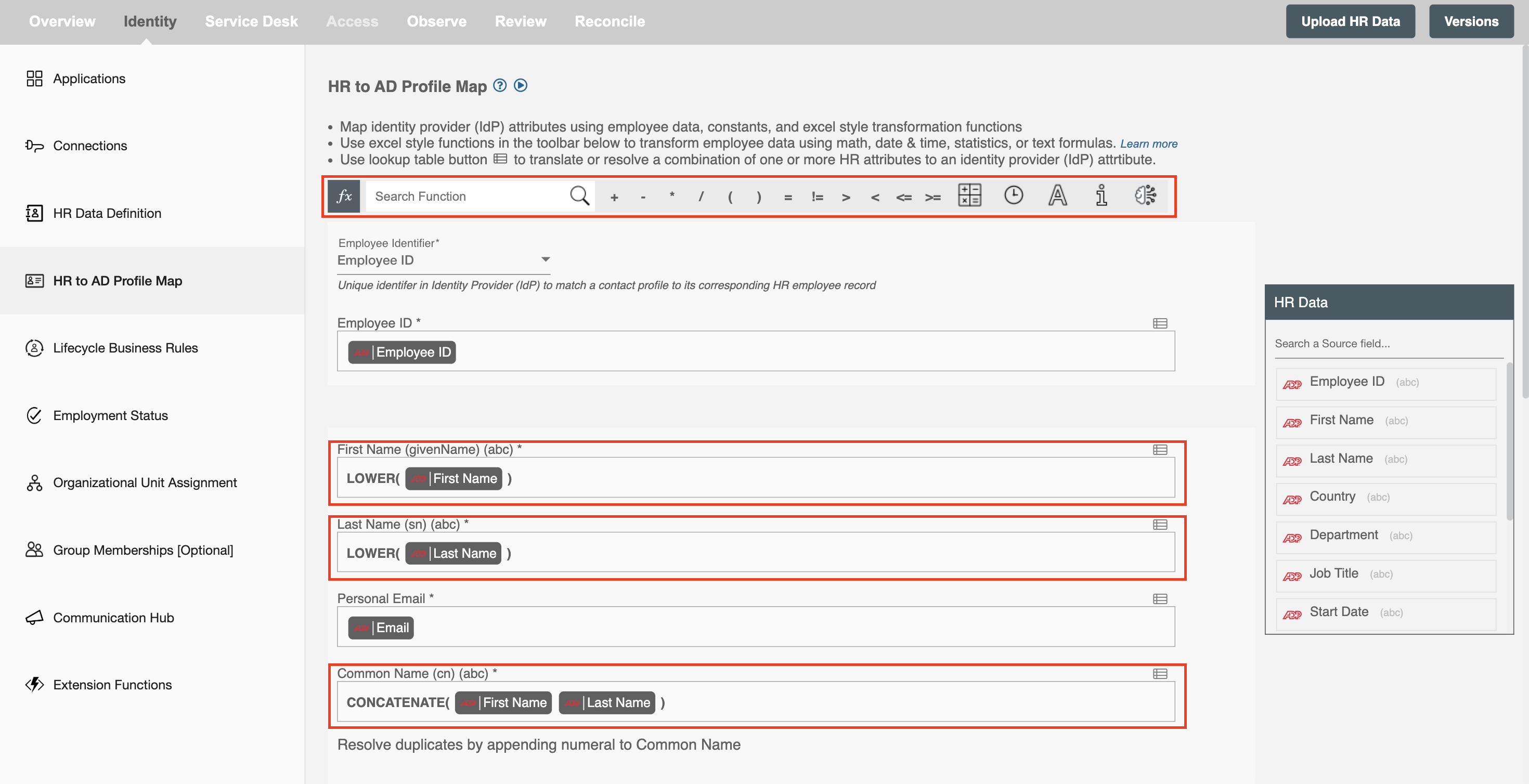
As shown in the image below, key sections of the mapping interface are highlighted.
-
The panel on the right displays ‘HR Data’ fields that can be dragged and dropped into the mapping fields. These are the HR attributes you defined in the "HR Data Definition" step.
-
The highlighted fields in the center represent AD attributes where HR data is mapped and transformed. It also has the data "Mapping and Transformation" capabilities to manipulate trigger data as well as your own input data to generate the final value for the corresponding AD attributes.
-
Hire2Retire, designed for business users and citizen integrators, provides hundreds of Excel-style functions for data mapping and transformation through the ‘fx’ toolbar. You can use these functions to format names, concatenate fields, or apply conditional logic during mapping.
Mandatory AD Attributes
Below is the list of the required attributes at the time of creating the entry in AD:
| # | Attribute Name | Description |
|---|---|---|
| 1 | Employee ID | This is the unique identifier for each employee in your Active Directory. The workflow will check if Employee ID exists and decide to create or update the profile in AD. Note: Ensure that existing employees in AD have the employeeID attribute populated to prevent duplicate record creation. |
| 2 | First Name | The naming attribute for attribute schema objects is the First Name (givenName). |
| 3 | Last Name | The naming attribute for attribute schema objects is the Last Name (sn). |
| 4 | Personal Email | This is the complete email address provided by the user for personal communication. It includes both the username and domain name (for example: john.doe@gmail.com). |
| 5 | Common Name | The naming attribute for attribute schema objects is the Common Name (cn). The common name must be unique in the schema container. |
Other AD Attributes
| # | Attribute Name | Description |
|---|---|---|
| 1 | City (l) | The name of the city in which the user resides. |
| 2 | Company (company) | The name of the company in which the user works. |
| 3 | Country / Region (co) | The name of the country as a text string, e.g., India, United States etc. |
| 4 | Country Code (c) | It contains the two-letter country code representing the user’s country (for example IN, US). |
| 5 | Department (department) | It contains the name for the department in which the user works. |
| 6 | Description (description) | Field used to describe additional information about the user. |
| 7 | Display Name (displayName) | The display name for an object, usually combination of first name, middle initial, and last name. |
| 8 | Email Address (mail) | It contains the primary email address of the user. |
| 9 | Email Addresses (proxyAddresses) | Multi-value property containing email addresses such as SMTP, X500, SIP etc. |
| 10 | Employee Number (employeeNumber) | The number assigned to an employee other than the ID. |
| 11 | External Email Address (targetAddress) | When set, emails sent to the user are forwarded to another mailbox address. |
| 12 | Fax (facsimileTelephoneNumber) | An exact copy of a document transmitted electronically using fax communication. |
| 13 | Home Phone (homePhone) | The secondary telephone number of the user, typically used for home contact. |
| 14 | Initials (initials) | The initials of the user's name, usually representing first and middle name letters. |
| 15 | IP Phone (ipPhone) | It contains the IP-based telephone number assigned to the user. |
| 16 | Job Title (title) | Contains the user's job title, such as Software Engineer or Manager. |
| 17 | Manager (manager) | Contains the distinguished name of the user’s manager in the directory. |
| 18 | Mobile Phone (mobile) | The primary mobile phone number of the user. |
| 19 | Office (physicalDeliveryOfficeName) | Contains the office location in the user's place of business. |
| 20 | Office Phone (telephoneNumber) | The primary office telephone number of the user. |
| 21 | Pager (pager) | It contains the pager number assigned to the user for communication. |
| 22 | Postal Code (postalCode) | It contains the zip code or postal code of the user’s address. |
| 23 | State / Province (st) | The state or province description for the user’s address. |
| 24 | Street Address (streetAddress) | An address description containing street name and house number. |
Resolve Duplicates by Appending Numerals
When duplicate common name (cn) is detected, selecting this option allows Hire2Retire to append numerals (e.g., 1, 2, 3 or 01, 02, 03) to this field ensuring unique values for each user. If "Not Apply" option is selected, any duplicate entries will result in an error message indicating that duplicate values exist.

Clear the field value for the selected attribute(s).
This option is useful when you want to remove existing values from specific AD attributes during updates. You can clear attribute values in Active Directory by selecting them from the multi-select option shown below. If you provide empty values for selected attributes in the mapped data, those attributes will be cleared. The values of unselected attribute(s) will be preserved as it is.
