Overview
Access certification is the process of reviewing and validating user access rights to ensure they remain appropriate and necessary over time. As organizations grow, employees often accumulate access to groups, applications, and resources that may no longer align with their current role. Without periodic reviews, this excess access can introduce security risks, compliance gaps, and operational inefficiencies.
With the Access Certification feature, Hire2Retire provides a structured and scalable way to conduct periodic access reviews. This feature is available under the Access Manager section and enables administrators, editors, and reviewers to create certification campaigns, assign reviewers, and track employee access reviews across groups and SCIM applications.
Key Concepts
-
Campaign: A certification review initiative that defines the scope, reviewers, owners, and timeline for reviewing employee access. Each campaign targets a specific set of groups or applications and runs within a defined start and due date window.
-
Audit Type: The category of access being reviewed.
Hire2Retiresupports two campaign types: "Group Audit" for reviewing memberships in identity provider groups, and "Application Audit" for reviewing access to SCIM or third-party applications. -
Scope: The set of groups or applications selected for review within a campaign. For Group Audit campaigns, the scope is defined by selecting groups from the connected identity provider. For Application Audit campaigns, the scope is defined by selecting applications from the Application Catalog.
-
Owner: A user responsible for managing the campaign and overseeing the review process. Owners have full read and write access to all review items, make final decisions on rejected items, and ensure remediation actions are completed. The campaign creator is automatically added as an owner.
-
Reviewer: A user assigned to evaluate review items within a campaign. Reviewers can be named individuals, employee managers, group owners, application owners, or dynamically assigned based on user attributes such as department or location.
-
Review Item: A single access record representing one user’s membership in a group or access to an application. Each review item is evaluated independently and can be approved or rejected.
-
Remediation: The follow-up process after a review item is rejected. The reviewer or owner must resolve the flagged access issue and mark the item as fixed to complete the review cycle.
Campaign Types
Hire2Retire supports two types of certification campaigns, each designed for a different access review scenario.
Group Audit
A Group Audit campaign reviews employee memberships in selected identity provider (IDP) groups. This type of campaign is commonly used to validate access to sensitive or high-privilege groups such as admin, IT operations, or security team groups.
The campaign scope is defined by selecting groups during campaign creation. The group types available depend on the connection type. Active Directory connections support AD Security Groups and Distribution Lists, Entra ID connections support Entra ID groups, and Hybrid connections support both AD and cloud groups.
When the campaign is created, Hire2Retire fetches the latest group membership data from the IDP system to ensure the review is based on current information. This process is repeated at midnight of the start date.
Application Audit
An Application Audit campaign reviews employee access to third-party applications such as ServiceNow, Salesforce, or Jira. This helps organizations validate that users still require access to external systems and business tools.
The campaign scope is defined by selecting applications from the Application Catalog. If an application is not available in scope, it can be added through the Access Application configuration page.
For Application Audit campaigns, application user access data is uploaded manually using file extracts. The campaign owner uploads data files through the campaign review page before the start date. Once the campaign start date is reached, uploads are disabled, and the data is frozen for review.
Campaign Lifecycle
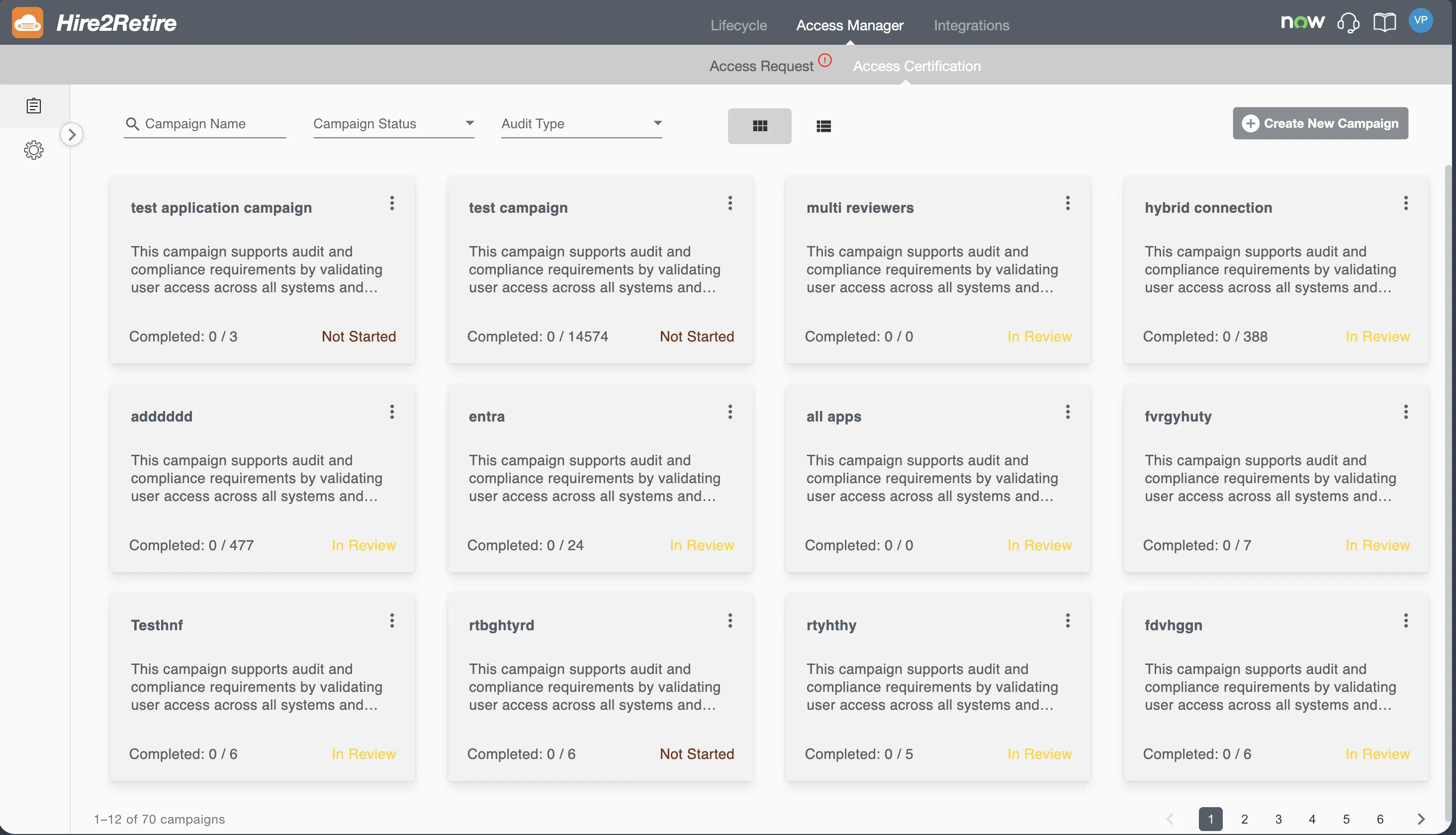
Each campaign progresses through a defined lifecycle with four statuses. Hire2Retire automatically transitions campaign states using a background service that evaluates campaign dates at regular intervals.
-
Not Started: The campaign has been created, but the start date has not yet been reached. During this stage, the campaign configuration can be edited, data can be uploaded (for Application Audit campaigns), and group membership data will refresh at midnight of the start date (for Group Audit campaigns).
-
In Review: The campaign is now active. Reviewers can approve or reject review items. Campaign configuration and review data become read-only at this stage and cannot be modified.
-
Completed: All review items within the campaign have been resolved. A review item is considered resolved when it is either approved, or rejected and subsequently marked as fixed after remediation.
-
Past Due: The due date has passed, while unresolved review items remain. The campaign becomes locked, and no further review actions (approve, reject, or mark as fixed) can be performed. The campaign remains available for reporting and audit purposes.
Permissions
Access to the Access Certification feature is governed by two layers: Hire2Retire account-level roles and campaign-level relationships (owner or reviewer).
Account-Level Permissions
These permissions are determined by the user's role within the Hire2Retire organization.
| Permission | Admin | Editor | Reviewer | Viewer | User |
|---|---|---|---|---|---|
| View Access Certification tab | Y | Y | Y | Y | Y |
| Create / Delete / Edit Campaigns | Y | Y | N | N | N |
| Review All Memberships | Y | N | Y | N | N |
| Review assigned Memberships | Y | Y | Y | Y | Y |
Campaign-Level Permissions
These permissions depend on a user's relationship to a specific campaign.
| Permission | Owner | Reviewer |
|---|---|---|
| View Access Certification tab | Y | Y |
| Create / Delete / Edit Campaigns | Y | N |
| Review All Memberships in Owned Campaign | Y | N |
| Review Assigned Memberships | Y | Y |
Admins have visibility into all campaigns regardless of ownership. Owners see campaigns they own, while Reviewers can only see campaigns assigned to them. Users who are owners in one campaign and reviewers in another will see both campaigns on their home page.
Getting Started
The Access Certification feature is organized into the following areas.
-
Campaign Home View, search, and filter certification campaigns. Navigate to campaigns for review or management.
-
Create Campaign Create new certification campaigns by defining the audit type, scope, owners, reviewers, and timeline.
-
Campaign Review Review employee access within a campaign by approving or rejecting individual review items and tracking remediation actions for rejected items.