ADP Vantage HCM API Integration Connection
ADP Vantage HCM (Automatic Data Processing) provides cloud-based human capital management (HCM) solutions to employers. ADP Vantage HCM-API will use ADP Vantage HCM API to fetch all the employees' data.
Create a Connection
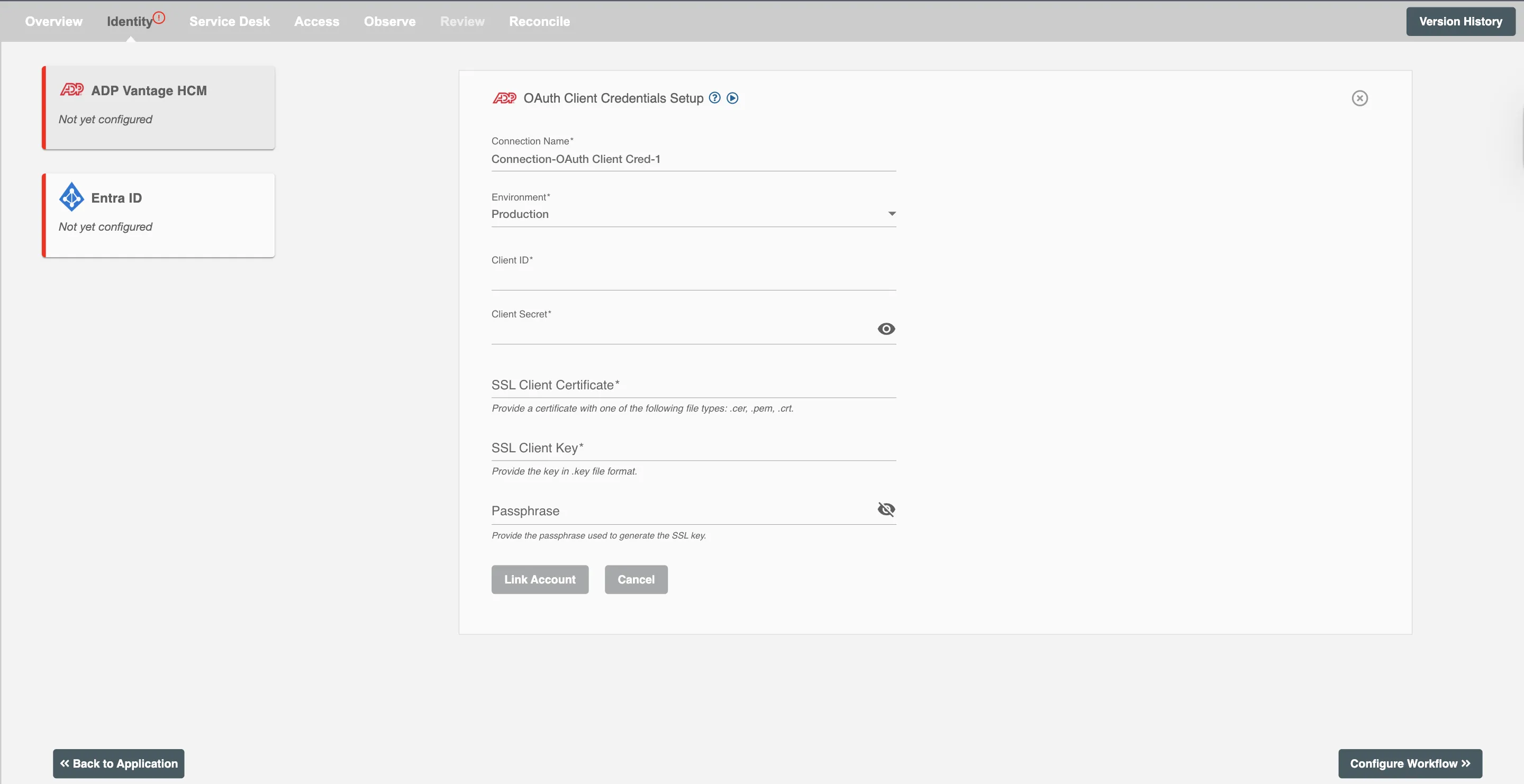
Hire2Retire requires the following details to create a connection with your ADP Vantage HCM server:
-
Connection Name - A user-defined nomenclature for your connection. By default, the connection name is "Connection-OAuth Client Cred", you can change the name as per your preference.
-
Client ID - This is the application Client ID to interact with ADP Vantage HCM API. You will get the client ID created at the time of your registration on ADP Vantage HCM portal.
-
Client Secret - This is the application Client Secret to interact with ADP Vantage HCM API. You will get the client secret created at the time of your registration on ADP Vantage HCM portal.
-
SSL Client Certificate - This is the SSL client certificate generated on registration with ADP Vantage HCM portal. You can find this in cert file (.cer, .pem or .crt.).
-
SSL Client Key - This is the SSL client key generated on registration with ADP Vantage HCM portal. You can find this inthe key file (.key).
-
Passphrase - This is the optional field, if you added a password while generating SSL certificate, you have to enter that password here, otherwise leave it blank.
ADP Vantage HCM Event Notification
The ADP Vantage HCM API provides employee change notifications to inform users about data change events. This functionality helps retrieve the latest data from ADP Vantage HCM and synchronize it with the Identity Management System. To receive timely updates in delta reports, contact your ADP Vantage HCM Representative to subscribe to the Event Notification. For detailed information, please refer to ADP Event Notification Guide.
With the introduction of ADP Vantage HCM Event Notification, Hire2Retire now supports Schedule Future Termination, through ADP Vantage HCM API integration, enhancing its ability to manage and process schedule terminations effectively.
Scopes
To subscribe to event notifications, contact your ADP Vantage HCM Representative and specify any required attributes for which you want timely syncing.
Below is the list of subscription based on the lifecycles:
| Lifecycle Based Subscription |
|---|
| worker.hire |
| worker.terminate |
| worker.rehire |
Below is the list of subscriptions based on attributes:
| Attributes Supported by Hire2Retire | Attribute Based Subscription |
|---|---|
| Birth Date | worker.birthdate |
| Maiden Name | worker.birthname |
| Work Email | worker.businessCommunication.email |
| Work Fax | worker.businessCommunication.fax |
| Work Phone | worker.businessCommunication.landline |
| Work Cell | worker.businessCommunication.mobile |
| Gender | worker.gender |
| Legal / Preferred Address City Legal / Preferred Address: Address Line 1 Legal / Preferred Address: Address Line 2 Legal / Preferred Address: Address Line 3 Legal / Preferred Address: Country Legal / Preferred Address: State / Territory Legal / Preferred Address: Zip Code Legal / Preferred Address: State / Territory Code |
worker.legalAddress |
| First Name Last Name Middle Name Salutation Preferred Name |
worker.legalName |
| Personal Email | worker.personalCommunication.email |
| Personal Fax | worker.personalCommunication.fax |
| Personal Contact: Home Phone | worker.personalCommunication.landline |
| Personal Mobile | worker.personalCommunication.mobile |
| Reports to Associate ID Reports to Name |
worker.reportsTo.modify |
| Business Unit (Code) Business Unit (Description) Home Department (Description) Home Department (Code) Home Cost Number (Code) Home Cost Number (Description) |
worker.workAssignment.homeOrganizationalUnits.modify |
| Location Code / Office Code Office Name Location Work From Home Locations: Address Line 3 Work From Home Locations: City Work From Home Locations: Country Code Work From Home Locations: County Work From Home Locations: State/Territory Code Work From Home Locations: State/Territory Work From Home Locations: Zip Code Work From Home Locations: Address Line 1 Work From Home Locations: Address Line 2 |
worker.workAssignment.homeWorkLocation |
| Reports to Position ID Termination Date Worker Category Position Status Termination Reason Effective Date Position ID Voluntary Indicator Assigned Shift Job Function Description Job Function Code Job Title Actual Start Date Company Code File Number Management Position |
worker.workAssignment.modify |
| Non-Legal / Secondary Address: Address Line 1 Non-Legal / Secondary Address: Address Line 2 Non-Legal / Secondary Address: Address Line 3 Non-Legal / Secondary Address: City Non-Legal / Secondary Address: Country Non-Legal / Secondary Address: County Non-Legal / Secondary Address: State/Territory Code Non-Legal / Secondary Address: State/Territory Non-Legal / Secondary Address: Zip Code |
worker.personalAddress |
Configuration
Once you have successfully configured the connections, you can continue with the Design section to configure the rest of the workflow following these steps in order.
- HR Data Definition
- HR to AD Profile Map
- Lifecycle Business Rules
- Employment Status
- Organizational Unit Assignment - Only defined in on-premise Active Directory
- Group Memberships
- Security Group Memberships
- Distribution List Memberships
- Microsoft 365 Groups Memberships Only defined in Hybrid (with Exchange Online Services) and Entra ID
- Entra ID Distribution List Memberships Only defined in Entra ID and Hybrid, when Exchange Online Services is configured
- Entra ID Security Groups Only defined in Hybrid (with Enable Entra ID Security Groups) and Entra ID
- Mail Enabled Security Group Memberships Only defined in Entra ID and Hybrid, when Exchange Online Services is configured
- Mailing List Assignment Provided in Google Workspace
- Communication Hub
Deployment
Once your workflow has been setup, you can optionally setup notifications and archival for your workflow.
- Compliance and Audit Trail
- Run Mode
- Error Notifications
- Monitor Receipt of Scheduled HR Extract
- Environment
Otherwise, you can proceed to deploy and test it on the Hire2Retire platform, see Deploy and Test Flow